Location Spoofer logo

Put your phone somewhere it isn't.

Location Spoofer drives an iPhone's system-wide GPS over USB with no jailbreak, or runs standalone on Android. Every app on the device follows.

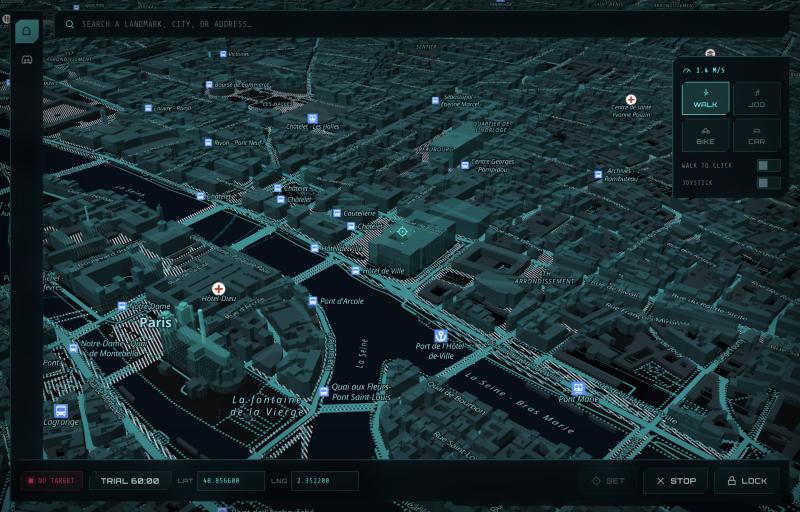
Location Spoofer running on macOS: a 3D vector map of central Paris with the movement-speed panel, coordinate readout and Set, Stop and Lock controls.

The same interface ships on every platform — a 3D vector map you can tilt and rotate, address search, and movement at walking, cycling or driving pace. Pick a point, press Set, and the device reports it until you stop.

Actual position 13.7563° N, 100.5018° E Bangkok, Thailand
reported as
Simulated position 35.6762° N, 139.6503° E Tokyo, Japan
Builds

Three platforms, one control deck

Every build ships the same map interface. Pick the one for your machine — the desktop apps talk to an iPhone over USB, and the Android app runs entirely on the phone.

Mechanism

No jailbreak. No root.

Two honest paths to the same result — because iPhone and Android expose location control in completely different ways.

iPhone

Driven over USB

The desktop app speaks the same developer protocol Xcode's "Simulate Location" uses, over a USB cable. Apple exposes no on-device spoofing API, so the phone has to be driven from a computer — but nothing on the phone is modified.

Mac / PC→USB→iPhone GPS
Android

Standalone on-device

Android has a built-in Mock Location developer feature. The app sets it directly, so every app that reads GPS sees your chosen point — no computer, no cable, nothing to plug in. Enable it once in Developer Options.

Android app→Mock Location→Phone GPS
Inside

Everything in one deck

3D Vector Map

Tilt and rotate real building geometry, lit in cyan-to-magenta by height.

Address Search

Jump to any landmark, city, or address and drop the pin instantly.

Movement Sim

Walk, jog, cycle, or drive to a tapped point at a realistic pace.

Saved Spots

Bookmark locations you use often and recall them in one tap.

Lock & Hold

Freeze an active session so a stray tap can't move your target.

Cyberpunk UI

Neon HUD panels, custom iconography, zero clutter — dark by default.

Pricing

One price, every platform

Pay once and it's yours. The same licence key unlocks every build, on every machine you own — no subscription, no renewal, nothing to cancel.

$29
one payment · no subscription
Buy — $29
  • One licence key, valid forever
  • Works on macOS, Windows and Android with the same key
  • 3D map, address search and movement simulation
  • Every future update included
  • Support on Discord and by email

Free trial, no card

Every build includes one hour of spoofing time, free. The timer only counts down while a location is actually being simulated — browsing the map costs you nothing. A countdown in the app shows exactly what's left.

How activation works

After paying you get a licence key by email. Open the app, click the trial badge at the bottom of the window, paste the key into Activate licence, and press Activate. The same key works on your other machines.

Payment is by bank transfer.  Card processors won't handle GPS simulation, so we take transfers instead — start an order and we'll send you the details. Nothing is charged automatically, and no card details pass through us.
Setup

Get running in four steps

STEP 01

Grab your build

Download the file for your platform above. On Android, open the .apk and allow install from your browser.

STEP 02

Enable developer mode

iPhone: Settings → Privacy & Security → Developer Mode. Android: tap Build number 7× to unlock Developer Options.

STEP 03

Connect & trust

iPhone: plug into the Mac/PC and tap Trust This Computer. Android: select the app as your mock location app.

STEP 04

Pick a spot, hit Set

Search or tap the map, then press Set. Your device now reports the ghosted location. Press Stop to restore real GPS.

Use responsibly.  Location Spoofer is built for development, QA and testing on devices you own. Our Terms of Service prohibit using it to cheat in games, commit fraud, stalk or harass anyone, or break any third party's terms. Many services detect a simulated location and act on the account — you are responsible for how you use it.
Questions

Frequently asked

Do I need a computer?

For iPhone, yes — the Mac or Windows app drives the phone over a USB cable, because Apple provides no way for an app on the phone to change the system location. For Android, no: the Android app runs entirely on the phone and needs no computer and no cable.

Is my phone modified? Do I need to jailbreak or root it?

Neither. On iPhone it uses Developer Mode, which is Apple's own switch, and the same developer protocol Xcode's Simulate Location feature uses. On Android it uses the built-in Mock Location developer setting. Nothing is installed permanently on the phone and nothing in the operating system is changed.

Does my location go back to normal?

Yes. Press Stop in the app, or unplug the phone, and your real GPS takes over again immediately.

Why isn't it on the App Store or Google Play?

Apple and Google both forbid apps that change the system location, so a tool like this can't be distributed through their stores by anyone. The desktop apps are downloaded directly; the Android build is an .apk you install yourself.

Can I get banned from an app or game?

Possibly. Many services detect a simulated location and act on the account, and that is their decision, not ours. Our Terms of Service prohibit using Location Spoofer to cheat in games, commit fraud, or break any third party's terms — if that's what you want it for, this isn't the tool for you.

What do I need on Windows?

Windows 10 or 11, the Edge WebView2 Runtime, and Apple Mobile Device Support (installed with iTunes) so Windows can see the iPhone. Both are free from Microsoft and Apple.

What do I need on a Mac?

A Mac with Apple Silicon (M1 or later) — the build is arm64 only. The app is unsigned, so the first launch needs a right-click then Open, rather than a double-click.

Which iPhones work?

iPhones running iOS 16 or newer, with Developer Mode available. You'll tap Trust This Computer the first time you connect.

Is this legal?

Location Spoofer is a tool for devices you own. Changing your reported location can break the terms of service of individual apps, and some uses are unlawful regardless. You are responsible for your own use — the Terms of Service set out what is and isn't permitted.

Can I buy it?

Not at the moment. The builds are finished and tested, but payments aren't open yet. Join the Discord and we'll post as soon as that changes.